
heyprof
An AI-Powered Platform for Higher Education
Domain
Generative AI / EdTech
Partners
Reutlingen University
Status
March 2026, Version 1.0
Ongoing project — development and evaluation are not yet complete. heyprof is currently in alpha. The features, evaluation results and conclusions described here reflect the state as of March 2026 and will be continuously updated as the project progresses.
heyprof is a web-based platform for course organisation and teaching support, characterised by the consistent integration of Large Language Models (LLMs). At its core is a dialogue-based AI tutor that guides students through Socratic dialogue — rather than providing ready-made solutions. The current state and context of the course is taken into account to provide targeted, level-appropriate support.
Whitepaper: heyprof – An AI-Powered Platform for Teaching
Reichenberger, Schieborn · March 2026 · Version 1.0
The Problem: AI in Teaching Without Context
Large language models can be used beneficially in teaching — yet learners are frequently left alone with general AI assistants. Beyond the problem of cognitive bypass, a common issue is that the AI's response does not match the student's current level of knowledge. The AI does not know the current state of the course and therefore often delivers answers that are too complex or that impede the learning process by using concepts not yet introduced.
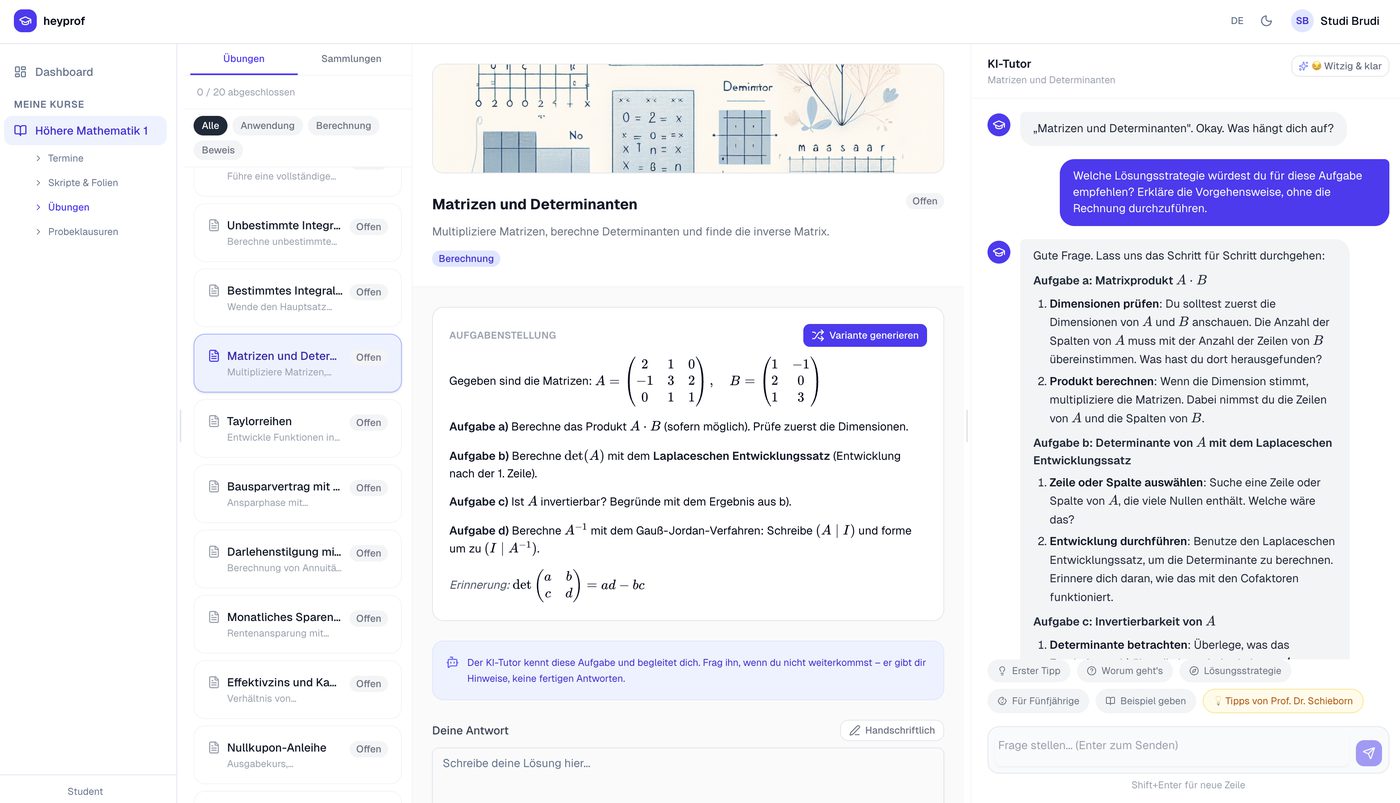
heyprof addresses these requirements by providing context-sensitive, targeted AI support. The AI tutor knows the exact text of the current task, the model solution and the instructor's private tutor notes, the student's current Python code and relevant passages from the course script.
Technical Architecture
Frontend
Next.js 15 with React and TypeScript (App Router). Tailwind CSS and Radix UI primitives. Mathematics is rendered client-side via KaTeX and MathJax.
Backend
Next.js API Routes (serverless) for all AI and business logic. Supabase (PostgreSQL with Row-Level Security) for data persistence and authentication.
AI Services
OpenAI gpt-4o-mini for chat, assessment, translation and summarisation; text-embedding-3-small for semantic document search (RAG); Whisper v2 for lecture transcription; DALL-E 3 for automatic task cover images.
Storage
Supabase Storage for PDFs, images and audio files. Semantic embeddings are stored in the pgvector extension of PostgreSQL.
The application runs on Vercel and requires no dedicated server infrastructure. Role-based access control (instructor / student) is enforced at the database level through Supabase RLS and server-side checks.
Features for Instructors
Course and Session Management
Instructors create courses in the dashboard and receive an eight-digit access code. Each course is divided into sessions corresponding to individual lecture dates. The order of all elements can be adjusted via drag-and-drop.
Material Management and Annotation
Uploaded PDF slides can be annotated using a freehand drawing tool. Students see these annotations as an overlay. After upload, materials are ingested: text is extracted, split into sections, embedded and stored in the vector store, enabling the AI tutor to retrieve relevant passages from the course script on demand.
Task Editor
The editor supports three types: Free text, Multiple choice and Code (Python). For each task, the instructor can store a model solution, private tutor instructions and labels and collections. Tasks can be imported from LaTeX source files. Cover images are generated automatically via DALL-E 3.
Exam Management
Exams consist of numbered questions with a score and countdown timer. Questions can be imported from scanned PDF exam sheets — an AI pipeline automatically extracts texts, numbering and points. After the exam, all submissions are available with AI-generated assessments.
Recordings and Transcription
A browser-based audio recorder enables direct recording of lectures. Whisper v2 transcribes the recording in the background. GPT-4o then generates a structured summary — visible to all students.
AI Configuration
At course level, tutor instructions can be stored for material and task questions, and the tutor can be deactivated entirely. The tutor's personality (referred to as "Soul" in the system) is configurable via Markdown files — tone, teaching style and focus areas.
Features for Students
Dashboard and Learning Studio
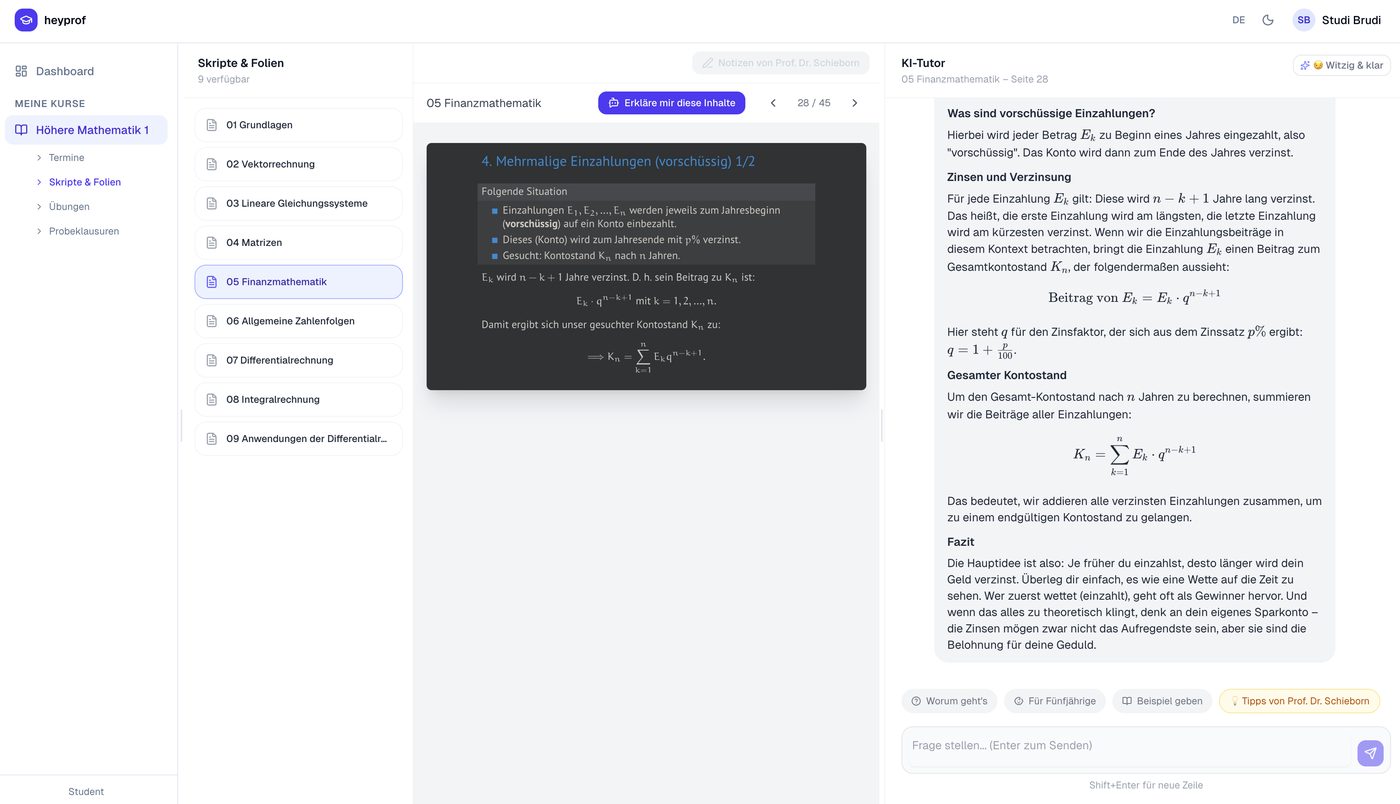
The dashboard shows enrolled courses with a progress indicator. The Learning Studio lists all sessions chronologically — with PDF viewer, annotation overlay, lecture recording with transcript and summary, and the session's tasks all on one page. In the PDF viewer, students can highlight a passage; the AI tutor receives this excerpt as a focus hint.
Tasks — Six Submission Channels
- Text/Code — direct input with instant AI assessment
- Drawing canvas — freehand solution for mathematical or diagrammatic answers
- QR photo — smartphone scans QR code, takes a photo, answer appears on the desktop
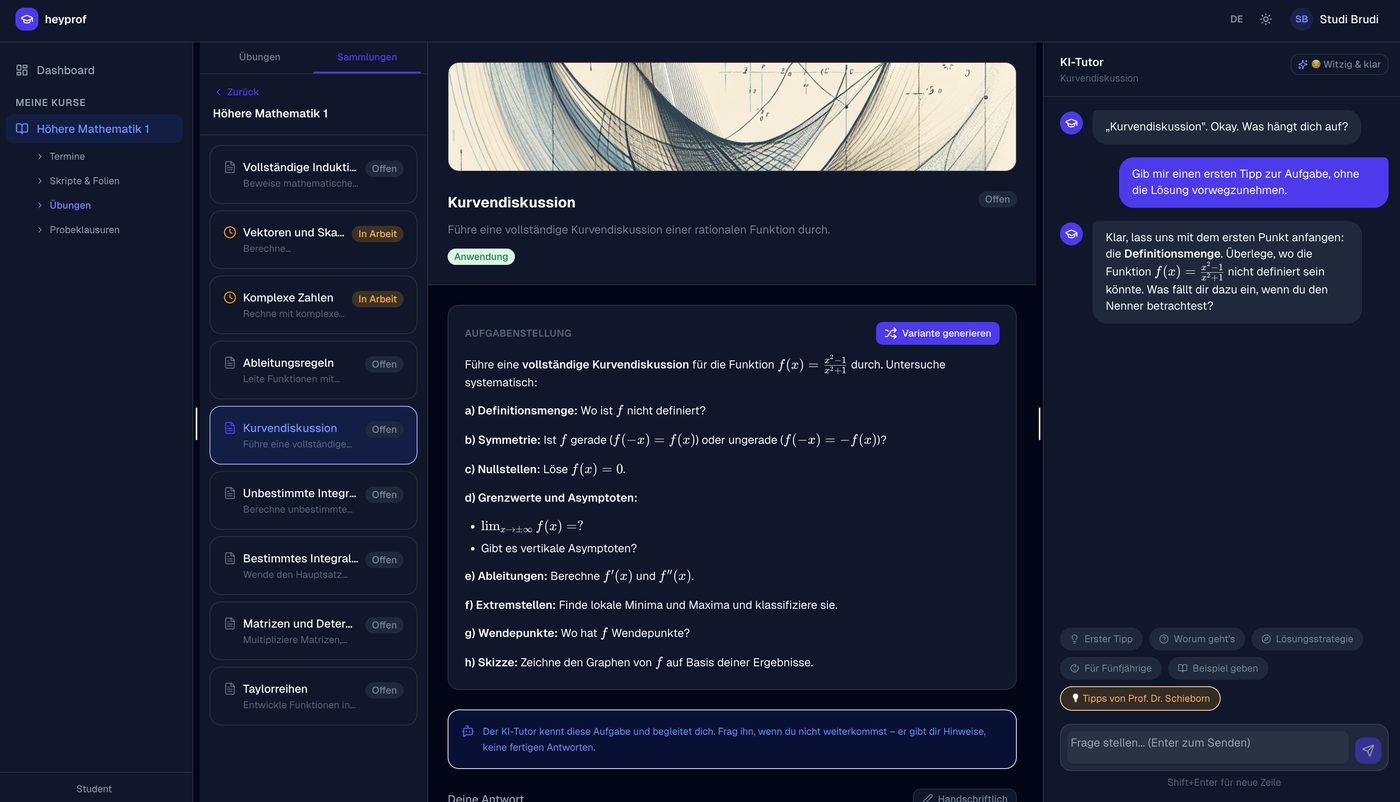
- AI tutor — immediate Socratic support in the integrated chat
- Practice variant — AI generates a structurally identical task with different numbers or function names
- Show solution — after a genuine attempt
AI Features and Pedagogical Integration
Retrieval-Augmented Generation (RAG)
Before the AI tutor responds, its system prompt is enriched with the complete task text, private tutor instructions, the student's current Python code, semantically retrieved passages from the course materials and the instructor's handwritten annotations. When a student asks "What is a linked list?", the system searches the most relevant sections from the course script — not from the model's general world knowledge — and forces the tutor to respond using exactly the concepts and notation of the lecture.
Socratic Mode and Explanation Mode
In Socratic mode, the tutor asks only counter-questions that move the student one step forward without revealing the solution. In explanation mode, the tutor explains directly, actively and vividly — with concrete examples and everyday metaphors, referencing the provided slide content.
Automatic Assessment
Text responses are assessed through a structured GPT-4o call. Handwritten or photographed solutions are analysed by the vision model, checked for relevance and converted to LaTeX notation. The assessment immediately updates the progress indicator.
Pedagogical Principles
Constructive Alignment
Each task, tutor instruction and collection is linked to a concrete learning objective. The AI guides students towards the expected solution — without giving it away.
Zone of Proximal Development
The Socratic tutor always attempts to identify the boundary of current understanding and ask a question that goes precisely one step beyond it.
Deliberate Practice
The variants feature enables immediate practice after understanding the original — same concept, new numbers, instant assessment.
Multimodal Input
heyprof accepts typed, drawn and photographic input equally, reducing the discrepancy between thinking and submission format.
heyprof demonstrates that AI support in higher education does not have to mean students bypass the learning process. By embedding the AI tutor deeply in the task workflow, injecting pedagogical context and constraining it to Socratic guidance, a potentially harmful tool becomes an effective learning aid. The platform is open-source and requires no dedicated server infrastructure. The first courses with heyprof will take place in the summer semester 2026.
Try It Now
heyprof is already available as an alpha version at heyprof.app. If you are interested in a personal demonstration or a conversation about using it in your course, we would be happy to hear from you.
Schedule a meetingWhitepaper
The full whitepaper describes the technical architecture, all features, the pedagogical foundations and the outlook for further development of the platform.
Download whitepaper (PDF)Volker Reichenberger, Dirk Schieborn · NXT Sustainability and Technology, Reutlingen University · March 2026, Version 1.0